Scroll, brightness, color.

Dialed in exactly how you like them.

A native macOS console for your display. One wheel notch becomes a continuous scroll, delivered frame by frame. Brightness runs through the CoreGraphics gamma table, so it works even on monitors that never implemented DDC/CI. Color is computed against the panel's own curves — and handed back to the system with a single click.

Download for macOS 14-day free trial

macOS 14 or later · Universal binary for Apple silicon and Intel · No account required

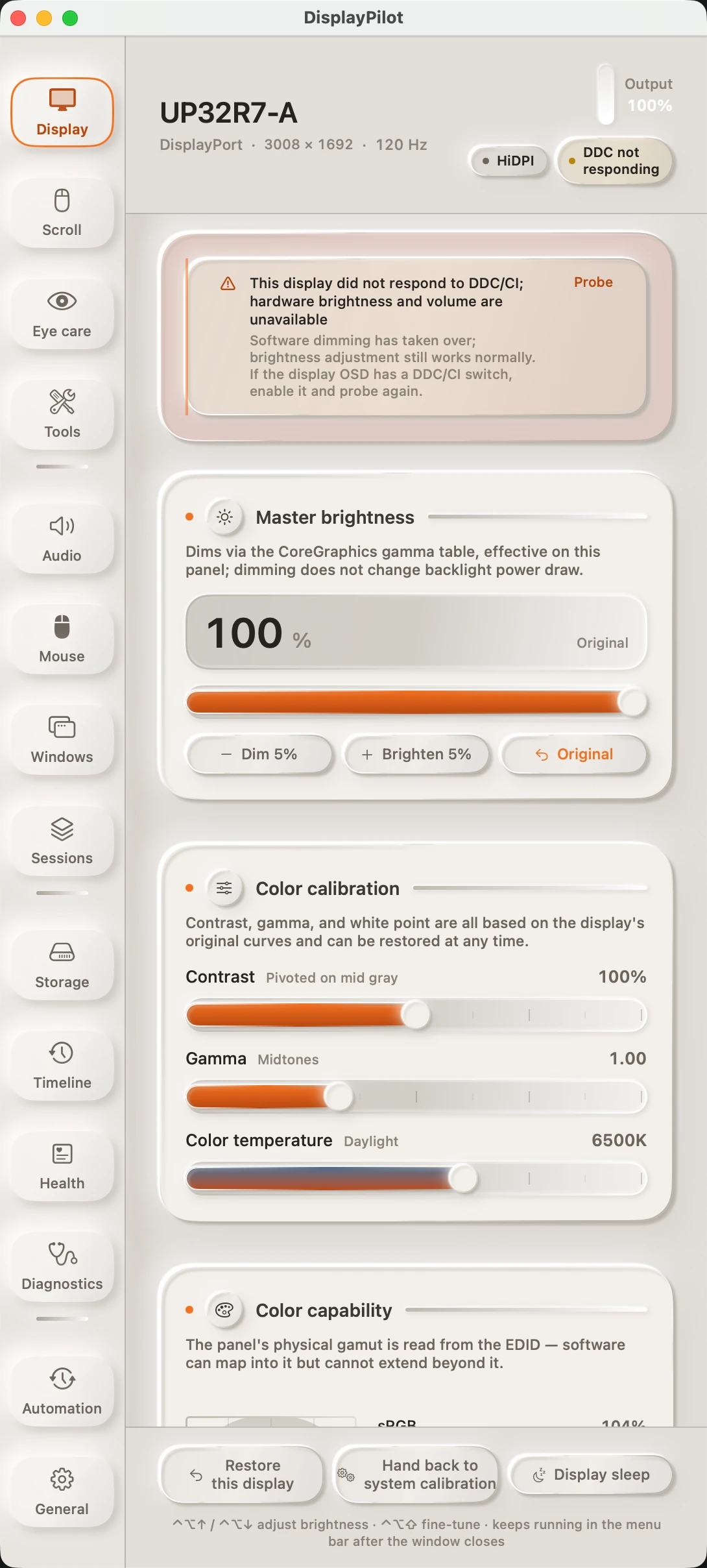
DisplayPilot's Display panel: monitor model and link information at the top, the software dimming slider below it, then the contrast, gamma, and color temperature sliders for color calibration, and the color gamut triangle read from the EDID.

This isn't System Settings with the switches rearranged. It's the work the system never did.

Frame-by-frame scrolling, dimming that doesn't depend on panel firmware, calibration anchored to the panel's original curves — and a cleanup path that quarantines before it deletes.

01 · Smooth scrolling

One notch, split into a stroke

A wheel notch stops being a single jump. Events are accumulated, then delivered on every display refresh — each frame emitting pending × (1 − e^(−dt/τ)). Because the decay is driven by elapsed time rather than by frame count, 60 Hz and 144 Hz feel the same. In our offline benchmark, the first frame at 120 Hz improved from 3 points to 9, and time-to-90% fell from 158 ms to 133 ms.

Windows that treat the wheel as a precision input or a zoom control — terminals, image viewers, slide decks — are handed back to the system by default. Hold ⌘ at any time to return to native scrolling. Smoothing ships off: it never takes over your wheel unless you turn it on. The interface keeps four live counters — seen, gesture, intercepted, delivered — so when a new mouse misbehaves, you can see exactly which layer is dropping it.
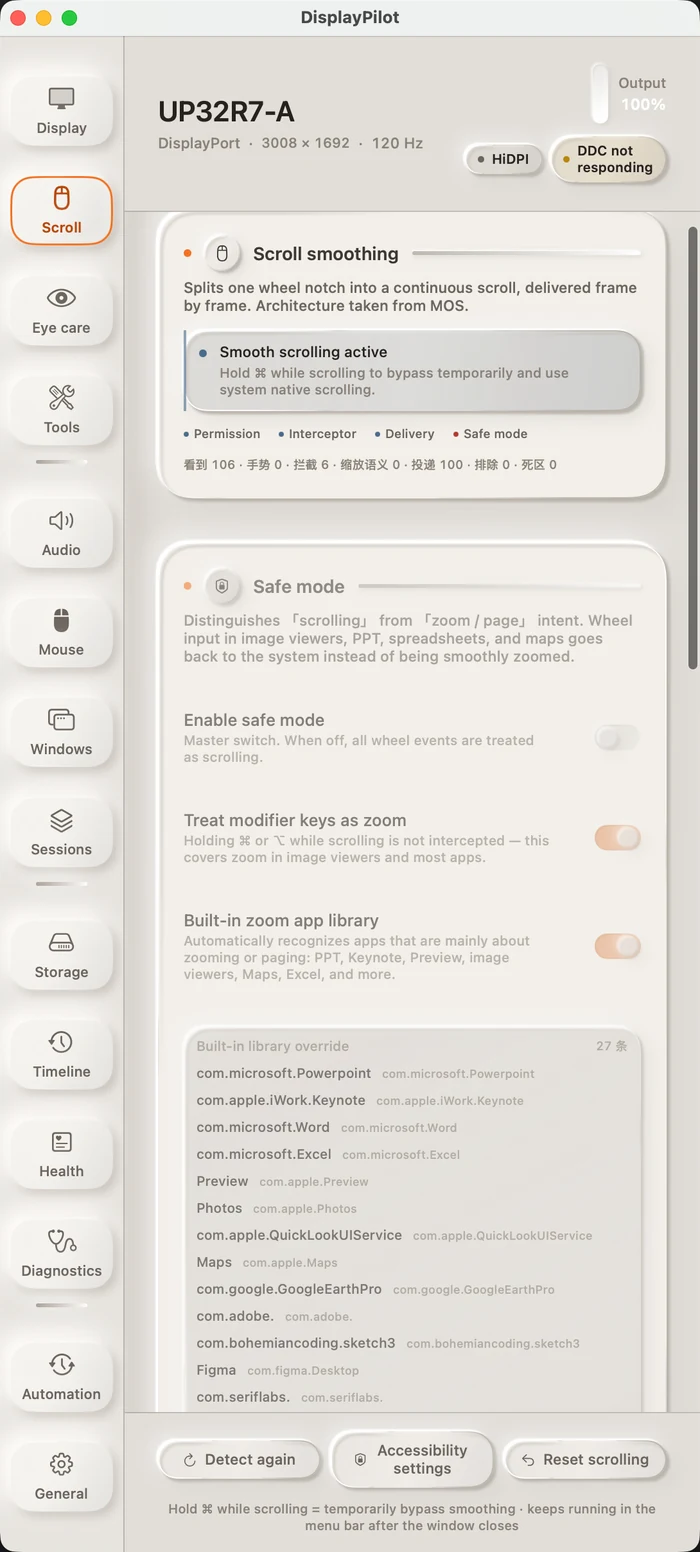
The Scrolling panel: smoothing status and four live counters at the top, the safe-mode switch below, and a library of 21 built-in per-app exceptions.

02 · Software dimming

Dim without touching panel firmware

Brightness runs through the CoreGraphics gamma table, so it works even on monitors that don't implement DDC/CI. Every write is read back and compared; when they disagree the app backs off and retries, up to four times. Resolution changes and wake-from-sleep replay the curve automatically, so it never silently stops working.

Replays always recompute from the panel's original baseline rather than from the current curve, so repeated adjustment can't accumulate error — measured, the mid-gray point moved from 0.5020 to 0.3012. macOS restores the display when the process exits, and there are two recovery paths that don't require the app to be running: one inside the app, and Scripts/restore-dimming.sh.

The lower half of the Display panel: the contrast, gamma, and color temperature sliders for color calibration, plus the gamut coverage read from the EDID.
Dimming and calibration share one gamma baseline, so the two channels can't contaminate each other.

03 · Color calibration

Anchored to the panel's own curves

Contrast pivots on mid gray, gamma works the midtones, and color temperature spans 2700–9000 K — all three computed from the panel's original curves. 6500 K is anchored as the identity transform, so the default state is exactly how your display already looks.

The physical gamut is read straight from the EDID and drawn as a CIE xy triangle, placed next to its coverage of sRGB and Display P3. What can align, aligns; the parts the panel physically cannot reach — high-saturation red and green — are labeled as out of reach instead of faked. One click hands calibration back to ColorSync.

Color temperature6500K · anchored as the identity transform

Gamma2.2· sRGB IEC61966-2.1

Gamut104%sRGB · covers only 77% of Display P3

04 · Safe cleanup

Quarantine first. Delete later.

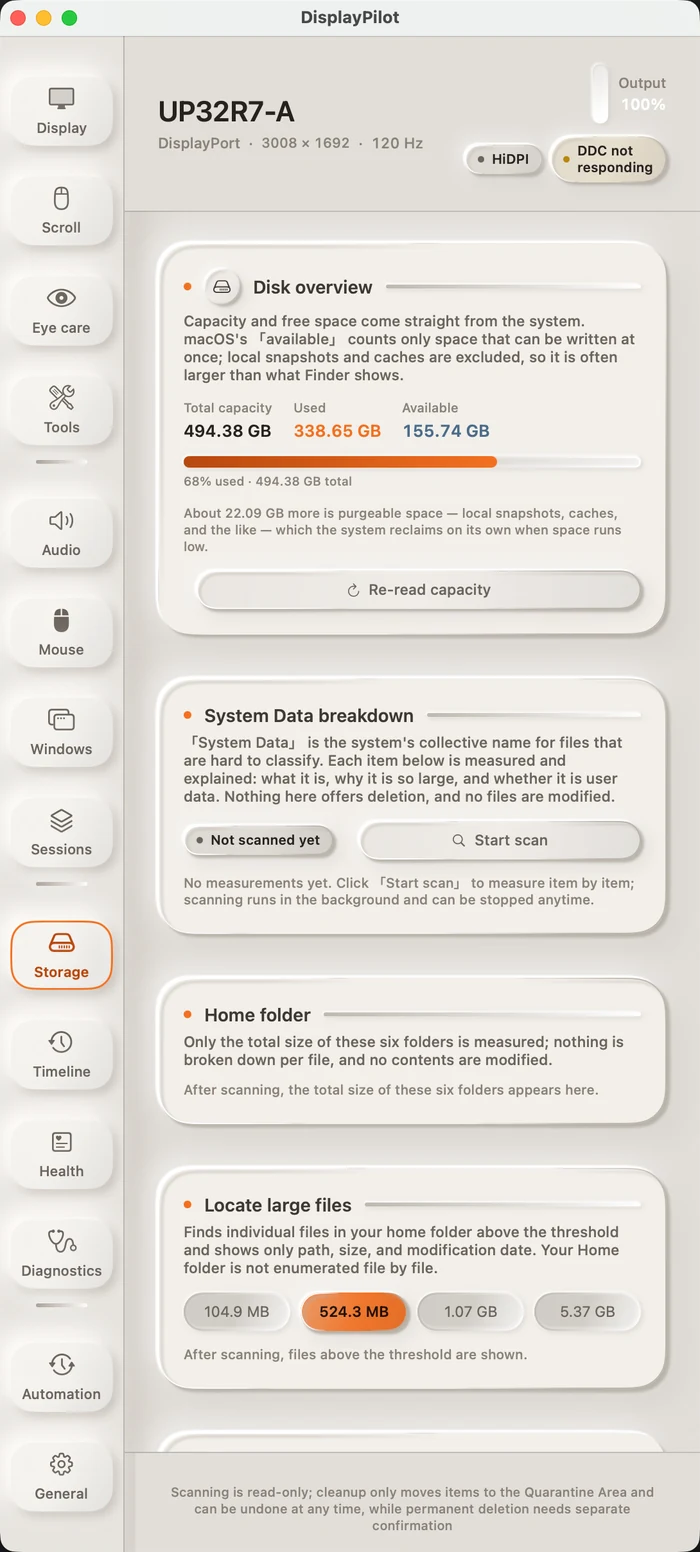
It only touches 13 categories of artifacts that have a deterministic way to be rebuilt: Xcode DerivedData, SwiftPM, CocoaPods, npm / pnpm / Yarn, Go, Gradle, Rust target, __pycache__, crash reports, Homebrew caches, and the like. Anything removed is moved into quarantine first, kept for 30 days by default, and restorable at any time.

Permanent deletion is off by default. Exactly one function in the whole app can do it, and it proceeds only when six conditions hold at once — fail any one and it aborts. The app doesn't request Full Disk Access; system-protected directories are skipped per macOS rules. Automation rules can pre-scan, never delete.

The Storage panel: disk overview, a breakdown of system data, personal folders, large-file discovery, and cleanable items — with a note at the bottom that scanning is read-only and cleanup only moves files to quarantine.

Session restore

Save your displays, windows, audio, scrolling, mouse, and eye-care settings as a named snapshot across 14 domains. Before restoring, it lists exactly what will change and waits for confirmation. If a domain is unavailable it skips that domain instead of failing the whole restore.

Inputs and the hardware channel

When the display speaks DDC/CI, switching HDMI / DisplayPort no longer means reaching for the OSD buttons, and hardware brightness, contrast, and volume sit in the same panel. When it doesn't, the app says “DDC not responding” and keeps working through the software channel — it doesn't pretend to succeed.

Accessibility

All 22 sliders and 22 switches expose accessibility labels and appear in the accessibility tree, and interface text was reworked to a 4.5:1 contrast baseline (the worst case was 2.65:1 before). Global hotkeys: ⌃⌥↑ / ⌃⌥↓, with ⇧ for ±1% fine-tuning.

Buy once.

No subscription, no account, no per-device math.

≈$14

One-time purchase · includes one year of updates from the date of purchase

  • 14-day free trial with every feature unlocked
  • Yours permanently after purchase; every new version released within the first year is free
  • After the first year you keep using the version you have — renewal is optional and never required to keep it running
  • When the trial ends, only 5 enhancement features pause. Restoring your displays, handing calibration back to the system, display sleep, and quitting always work — and never need a network connection

Buy without the checkout page (works on restricted networks): scan or tap a code, then email us your order.

Email your order

Cannot reach the checkout (blocked network, for example)? Email huayanming2019@gmail.com or message 17551085105 and we will take the payment directly.

Buy · $14

Checkout is live (crypto). Your activation code appears right after payment. If the button does not appear, open the order page directly.

System requirements

macOS 14 Sonoma or later · Universal binary for Apple silicon and Intel · No third-party dependencies, no background service · Only scroll smoothing and mouse mapping require Accessibility permission · Works offline